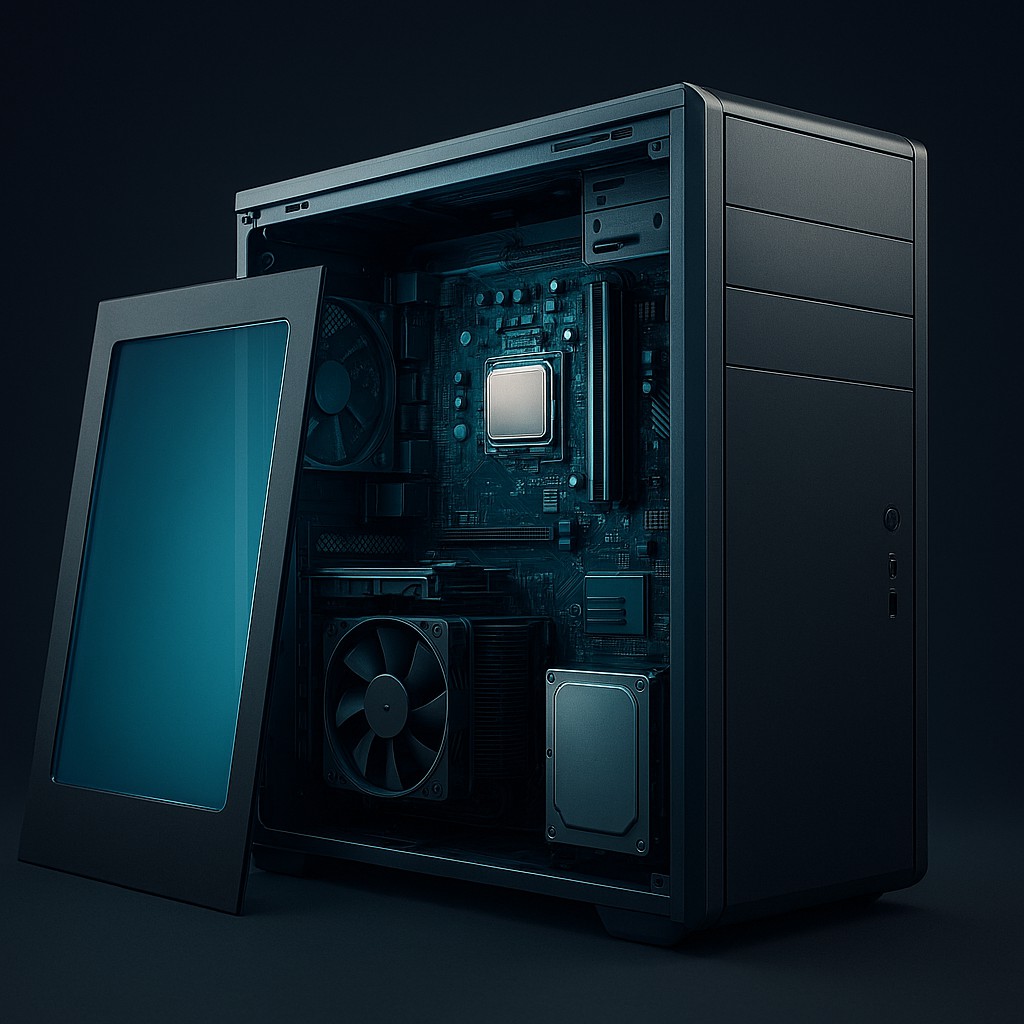
Imagine for a moment that you are standing in front of a sleek, humming metal box. To someone who has never seen one, it might look like a magical portal or perhaps just a very expensive paperweight. We spend hours every day staring into its glowing glass face, tapping plastic keys, and asking it to perform miracles, from calculating complex taxes to showing us high-definition videos of cats falling off sofas. Yet, many of us treat the computer like a "black box," a mysterious object where electricity goes in and magic comes out. We rely on it for our jobs, our friendships, and our fun, often without the slightest clue how it actually handles a single click.
Understanding how a computer works isn't just for experts who spend their weekends writing code in a basement. It is the ultimate way to feel in control in the digital age. When you peel back the layers of plastic and silicon, you discover a world of incredible logic, breathtaking speed, and elegant design. Learning about computer parts is like learning the anatomy of a living creature. It helps you fix problems, makes you a smarter shopper, and, most importantly, helps you appreciate the human creativity required to turn sand and electricity into the most powerful tool in history.
The Architecture of a Digital Brain
To understand how the different parts work together, it helps to use a metaphor. Think of a computer not as a machine, but as a high-speed professional kitchen. In this kitchen, the chef does the actual work, the counter is where ingredients are prepped, and the pantry is where everything is stored for the long term. Without all three working together, you don't get a meal; you just get a pile of raw potatoes and a very frustrated cook.
In the world of technology, this kitchen follows what is known as the Von Neumann architecture. This is just a technical way of saying that the computer has a place to process information, a place to remember what it is doing right now, and a place to keep things for later. Every single part we are about to discuss fits into one of these categories. Whether you are using a smartphone, a laptop, or a massive supercomputer, the basic rules stay the same. They all take "input" (like a mouse click), process it, and give you back "output" (like a cat video).
The Maestro of the Motherboard
At the heart of every computer lies the motherboard. If the computer were a city, the motherboard would be the foundation, the roads, and the power grid all rolled into one. It is a large, flat circuit board, usually green or black, that acts as the nervous system for the entire machine. Every single part, from the smallest screw to the largest graphics card, eventually connects to it. Its job is to provide a platform for communication, allowing data to zip back and forth between the brain and the memory.
Attached directly to this board is the Central Processing Unit, or the CPU. This is the "chef" we mentioned earlier, and it is the most important part of the machine. The CPU is a small silicon chip, usually no bigger than a cracker, but it can perform billions of math problems every second. When you tell a computer to open a file, the CPU translates that command into a series of ones and zeros, works through the logic, and tells the other parts what to do. It is the heartbeat of the system. Without it, the computer is just a very quiet, very expensive box of metal.
Because the CPU works so hard, it gets incredibly hot. Imagine doing a billion math problems in a second; you would be sweating too. To keep the CPU from melting its own circuits, it is always covered by a "heat sink" and a fan. The heat sink is a block of metal with many thin fins that pulls heat away from the chip, while the fan blows cool air over it. If you have ever heard your laptop sound like a jet engine taking off, that is just the cooling system trying to keep the chef from overheating during a busy rush.
Speed Versus Storage in the Memory Game
One of the biggest points of confusion for new users is the difference between RAM and storage. They are both measured in Gigabytes (GB), which makes them sound the same, but they do completely different jobs. Let's go back to the kitchen. RAM (Random Access Memory) is your counter space. It is where you put the ingredients you are using right now. If you have a huge countertop, you can chop vegetables and season a steak at the same time. If your counter is tiny, you have to keep putting things away to make room, which slows you down.
RAM is "volatile" memory, meaning it only keeps information while the power is on. The moment you turn off your computer, everything in the RAM vanishes. This is why it is so fast; it doesn't have to worry about permanent filing. On the other hand, your storage (a Hard Drive or Solid State Drive) is the pantry. This is where you keep the flour and spices. The pantry is huge and holds a lot, but it takes a few seconds to walk over and find what you need. Unlike RAM, storage is "non-volatile," meaning it keeps your files safe even when the power is cut.
| Component |
Function |
Analogy |
Speed |
| CPU |
Main processing and logic |
The Executive Chef |
Lightning Fast |
| RAM |
Short-term active memory |
The Kitchen Counter |
Extremely Fast |
| SSD/HDD |
Long-term data storage |
The Pantry |
Slow to Moderate |
| GPU |
Visuals and image processing |
The Food Stylist |
Optimized for Visuals |
| Motherboard |
Connectivity and paths |
The City Streets |
High Bandwidth |
In recent years, most storage has shifted from Hard Disk Drives (HDD) to Solid State Drives (SSD). Old hard drives used a spinning magnetic platter and a tiny needle to read data, much like a record player. They worked well but were slow and easy to break. SSDs use "flash memory," which has no moving parts. This makes them much faster and more durable. If your computer feels slow to start up, switching from an HDD to an SSD is often the best upgrade you can make. It is like replacing a heavy, stuck cupboard door with a high-speed sliding one.
The Artist Behind the Screen
While the CPU is great at general logic, it isn't actually very good at drawing. Imagine asking a brilliant mathematician to paint a masterpiece; they might understand the shapes, but they aren't built for the brushwork. This is where the Graphics Processing Unit, or GPU, comes in. The GPU is a specialist designed strictly to handle visual tasks and many math problems at the same time. While a CPU is like a high-speed sports car going fast in one direction, a GPU is like a fleet of hundreds of tiny scooters that can all move at once.
Originally, GPUs were just for gamers who wanted to see realistic explosions. However, as our digital world has become more visual, the GPU has become essential for everyone. It handles the windows on your screen, high-definition video, and even the complex math needed for Artificial Intelligence. Without a dedicated GPU, or the "integrated" graphics built into modern CPUs, your screen would look choppy. The GPU takes the burden of "painting" the screen off the CPU, allowing the chef to focus on the recipe while the artist focuses on the presentation.
High-end GPUs are often the largest and most expensive parts of a computer. They have their own fans and use a lot of power because they are essentially mini-computers themselves. They even have their own dedicated "VRAM" (Video RAM) so they don't clutter up the main kitchen counter with art supplies. Whether you are editing a video or playing a game, the GPU makes sure every pixel is the right color at the right millisecond.
Delivering Power to the Machines
None of these parts would work without a steady diet of electricity. This is the job of the Power Supply Unit, or PSU. Many people ignore the power supply, thinking it is just a boring box with wires, but it is a critical part of the system. Your computer doesn't run on the same kind of electricity that comes out of your wall. Wall outlets provide Alternating Current (AC), but sensitive silicon chips need stable, low-voltage Direct Current (DC).
The PSU acts as a translator and a filter. It takes the high-voltage electricity from your house and converts it into the specific levels the motherboard, CPU, and GPU need. A good power supply also protects your parts from power surges. If the PSU is low quality and fails, it can send a bolt of electricity through the motherboard, frying every expensive part in the system. It is the unsung hero that keeps the heart beating.
In a laptop, the power supply is split between the "brick" on your charging cable and the internal battery. In a desktop, it sits inside the case, pulling in cool air and pushing out heat. People who build their own computers have to carefully calculate how much wattage they need. If you have a powerful "chef" (CPU) and a demanding "artist" (GPU), you need a power supply that can handle the load. Efficiency is key; high-quality units waste less energy as heat, which keeps your room cooler and your electric bill lower.
The Shell that Breathes
Finally, we have the computer case, often called the chassis. It might seem like just a protective skin, but the case is a carefully designed environment for airflow. Because computers create so much heat, they would cook themselves if kept in a sealed box. The case features specific vents that let cool air in and push hot air out. It acts as the lungs of the machine, keeping everything at a safe temperature.
Modern cases are also about style. Some people like "sleeper" builds that look like boring office machines from the 1990s but hide powerful hardware inside. Others prefer cases with glass panels and colorful lights. Regardless of the look, the main job is organization and protection. It holds all the pieces in place so that the motherboard doesn't bend, the wires don't get tangled, and the delicate circuits are shielded from dust and pets.
The case also holds the ports, such as USB slots and headphone jacks, that let you interact with the hardware. This brings us back to the start: the bridge between the human and the machine. The case provides the interface where you plug in your mouse and your monitor, completing the cycle. It is the final piece of the puzzle that turns a collection of wire and silicon into a working tool.
Common Myths and Misconceptions
As we finish our tour, it is important to clear up a few common myths. One of the most common is that "more RAM makes your computer faster." While adding RAM helps if you are running out of counter space, adding huge amounts to a computer that only does basic tasks won't make your browser open any faster. It just gives you a bigger counter that you aren't using. Speed is mostly determined by the age of the CPU and whether you use an SSD.
Another myth is that "the number of cores in a CPU is all that matters." You might see an ad for an 8-core processor and assume it is twice as good as a 4-core one. In reality, it depends on the task. Some jobs, like playing a simple game, might only use one or two cores at a time. In that case, a very fast 4-core processor will actually work better than a slower 8-core one. It is the difference between having four world-class chefs or eight mediocre cooks; the better choice depends on how many dishes you are making at once.
Finally, many people believe computers are "smart." Actually, it is the opposite. Computers are remarkably dumb. They cannot think or feel, and they have no intuition. They are simply incredibly fast at following instructions. Every "smart" thing a computer does is the result of a human programmer writing a clever set of rules. When you understand the parts, you realize that you are the true intelligence in the room. The computer is just a very obedient tool that amplifies your own abilities.
Embracing the Digital Architecture
By now, that mysterious metal box should feel less like an alien object and more like a well-organized workshop. You know the CPU is the chef doing the thinking, the RAM is the busy counter space, and the storage is the reliable pantry. You understand that the motherboard is the foundation holding it all together, while the GPU paints the pictures on your screen.
There is a real sense of satisfaction in knowing how your tools work. It turns you from a passive user into an informed one. Whether you decide to build your own PC or just want to know why your laptop is getting hot, you now have a map of the digital world. Technology will change, and speeds will get faster, but the core ideas of input, processing, memory, and output are here to stay. Look at your devices with new curiosity, for you are now a master of the machine.